Understanding VMware vSphere 6.0 with Teach Me Cloud
Quick answer: VMware vSphere 6.0 is an older server virtualization platform released in 2015. It introduced concepts and tools such as ESXi, vCenter Server, virtual machine management, vMotion, High Availability (HA) and Distributed Resource Scheduler (DRS). Teach Me Cloud covers these concepts through a structured 15-module learning programme with practical exercises and labs.
What is VMware vSphere 6.0?
VMware vSphere 6.0 was released on 12 March 2015. It is a server virtualization platform that allows organizations to run multiple virtual machines (VMs) on a single physical server.
It helps IT administrators manage computing resources, virtual machines, networking and storage within a virtualized data center environment.
Four important components of VMware vSphere 6.0 include:
- ESXi 6.0: The hypervisor installed on physical servers to create and run virtual machines.
- vCenter Server 6.0: A centralized management platform used to manage multiple ESXi hosts and virtual machines.
- Platform Services Controller (PSC): Handles services such as single sign-on, licensing and certificates.
- vSphere Web Client: The browser-based interface administrators used to manage the virtual infrastructure.
Why understand VMware vSphere 6.0?
Although VMware vSphere 6.0 is no longer supported, understanding its architecture provides useful insight into traditional virtualization environments and enterprise IT infrastructure.
- Understand how physical servers are used to run multiple virtual machines.
- Learn the fundamentals of ESXi hosts, vCenter Server, networking and storage.
- Explore concepts such as vMotion, High Availability, Fault Tolerance and DRS.
- Build a foundation for understanding how virtualization platforms have evolved in newer versions.
- Develop familiarity with legacy VMware environments that may still be encountered during infrastructure maintenance and migration projects.
Note: vSphere 6.0 is an older version and should be studied for educational purposes and legacy-environment understanding, not as a recommendation for new production deployments.
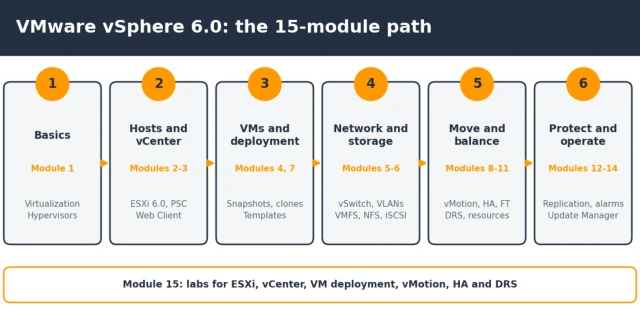
Over time, VMware introduced several changes to its virtualization platform. Here is a comparison of some important differences between vSphere 6.0 and vSphere 7.0:
| Area | VMware vSphere 6.0 | VMware vSphere 7.0 and later |
|---|---|---|
| Sign-on and licensing | External or embedded Platform Services Controller (PSC). | PSC services integrated into vCenter Server. |
| Admin console | Flash-based vSphere Web Client. | HTML5-based vSphere Client. |
| Patching | vSphere Update Manager. | vSphere Lifecycle Manager. |
Want to explore a newer VMware version? Read our VMware vSphere 8.0 guide.
Who is this VMware vSphere 6.0 course for?
The learning programme is suitable for people who want to understand virtualization concepts and traditional VMware infrastructure.
- System administrators who manage Windows or Linux servers.
- Network and storage engineers who work with virtualized environments.
- IT support engineers looking to develop infrastructure management skills.
- Freshers with basic IT knowledge who want to understand server virtualization.
- IT professionals interested in learning about legacy VMware environments.
The 15-module VMware vSphere 6.0 syllabus
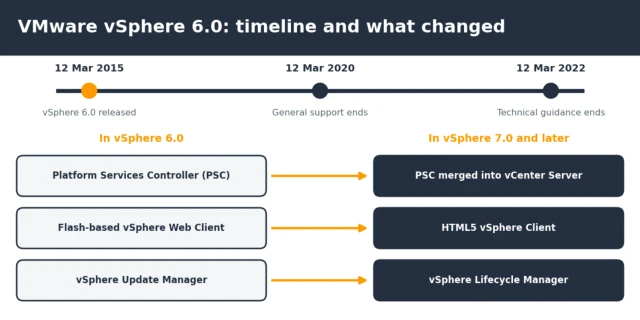
The Teach Me Cloud VMware vSphere 6.0 learning programme is organized into 15 modules, starting with virtualization fundamentals and progressing towards infrastructure management and practical exercises.
| Module | Topic | What you cover |
|---|---|---|
| 1 | Introduction to Virtualization | Virtualization fundamentals, hypervisors and vSphere 6.0 architecture. |
| 2 | ESXi 6.0 Installation | Hardware requirements, installation, host configuration and management network. |
| 3 | vCenter Server 6.0 | Installation, Platform Services Controller and vSphere Web Client. |
| 4 | Virtual Machine Management | VM creation, guest operating systems, VMware Tools, virtual hardware and snapshots. |
| 5 | Virtual Networking | Standard and distributed vSwitches, VLANs, port groups and NIC teaming. |
| 6 | Storage Configuration | Local storage, VMFS, NFS, iSCSI, Fibre Channel and datastores. |
| 7 | VM Deployment | Templates, cloning, guest customization and content libraries. |
| 8 | Virtual Machine Migration | Cold migration, vMotion and Storage vMotion. |
| 9 | Resource Management | CPU and memory allocation, resource pools, shares, reservations and limits. |
| 10 | High Availability | VMware HA, Fault Tolerance and cluster configuration. |
| 11 | Distributed Resource Scheduler | DRS configuration, affinity rules and load balancing. |
| 12 | Backup and Recovery | vSphere Replication, VM backup and restore operations. |
| 13 | Monitoring and Security | Performance monitoring, alarms, roles and permissions, and troubleshooting. |
| 14 | Patch Management | VMware Update Manager, Host Profiles and ESXi updates. |
| 15 | Practical Labs | ESXi, vCenter, VM deployment, vMotion, HA and DRS. |
How Teach Me Cloud teaches VMware vSphere 6.0
At Teach Me Cloud, the focus is on helping learners understand IT infrastructure concepts through structured explanations and practical learning.
- Practical learning: Understand virtualization concepts through hands-on labs, exercises and real-world scenarios.
- Experienced trainer: Learn with Manjeet Rawat, Microsoft Certified Trainer (MCT) and AWS certified professional, with 19+ years of IT experience.
- Flexible batches: Online, weekday and weekend learning options.
- Career support: Resume guidance and interview preparation to help learners prepare for IT roles.
- Learning community: Teach Me Cloud has trained 10,000+ students and has 147K+ YouTube subscribers.
Want to explore the teaching approach before enrolling? Watch free lessons on our YouTube channel.
You can also explore available training programmes through our courses page.
How to start learning VMware vSphere 6.0
If you are new to virtualization, you can follow these steps to build your understanding:
- Start with the basics: Watch free VMware lessons on our YouTube channel.
- Understand networking: Revise IP addresses, subnets, VLANs and basic networking concepts.
- Explore the course: Check the VMware and other IT training programmes available on our courses page.
- Practise the concepts: Work through ESXi, vCenter, virtual machine deployment, vMotion, HA and DRS in an appropriate learning lab environment.
VMware vSphere 6.0 FAQs
What is VMware vSphere 6.0?
VMware vSphere 6.0 is a server virtualization platform released on 12 March 2015. It uses ESXi 6.0 to run virtual machines and vCenter Server 6.0 to centrally manage multiple hosts.
Is VMware vSphere 6.0 still supported?
No. VMware ended general support for vSphere 6.0 on 12 March 2020. Technical guidance ended on 12 March 2022.
Why should I learn VMware vSphere 6.0?
Understanding vSphere 6.0 can help learners explore traditional virtualization architecture, ESXi, vCenter, virtual networking, storage, vMotion, HA and DRS. These concepts also provide useful background when studying newer virtualization environments.
What is the Platform Services Controller (PSC)?
The Platform Services Controller handles services such as single sign-on, licensing and certificates for vCenter Server 6.0. In vSphere 7.0, these services were integrated into vCenter Server.
What is the difference between vMotion and Storage vMotion?
vMotion moves a running virtual machine from one host to another. Storage vMotion moves a running virtual machine's files from one datastore to another.
What is the difference between HA and Fault Tolerance?
High Availability (HA) restarts virtual machines on another available host after a host failure, resulting in a short interruption. Fault Tolerance maintains a live secondary copy of a virtual machine to provide continuous availability during certain failures.
Can a beginner learn VMware vSphere 6.0?
Yes. The learning programme begins with virtualization fundamentals and hypervisors. Basic Windows or Linux knowledge and an understanding of networking can make the learning process easier.
Do you offer VMware training for companies?
Teach Me Cloud provides customized IT and cloud training programmes. Companies interested in VMware or infrastructure training can contact the team to discuss their training requirements.
Explore VMware vSphere 6.0 with Teach Me Cloud
Interested in understanding VMware virtualization and its foundational concepts? Explore the Teach Me Cloud training programmes or contact our team to learn more.
You can also explore more IT and cloud learning resources on our Teach Me Cloud blog.
Teach Me Cloud is an independent training provider and is not presented here as an official VMware or Broadcom training partner. VMware, vSphere, ESXi and vCenter are trademarks of Broadcom Inc. and/or its subsidiaries.
 Launch your Graphy