There are no items in your cart
Add More
Add More
| Item Details | Price | ||
|---|---|---|---|
Quick answer: VMware vSphere 8.0 is VMware's server virtualization platform. It pairs the ESXi hypervisor with vCenter Server, so one physical server runs many virtual machines. Teach Me Cloud teaches it in 12 modules, from installing ESXi to vMotion, HA and DRS, with hands-on labs.
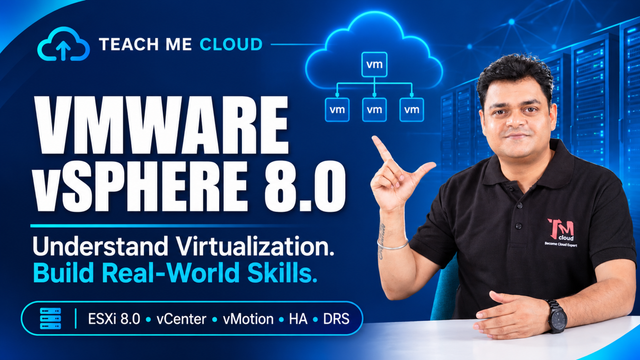
VMware vSphere 8.0 is the platform that turns physical servers into a pool of virtual machines (VMs). Two products do the heavy lifting.
| Module | Topic | What you cover |
|---|---|---|
| 1 | Introduction to Virtualization | Virtualization concepts, hypervisors, VMware architecture, vSphere 8.0 components |
| 2 | ESXi 8.0 Installation | Hardware requirements, installation, initial configuration, host management |
| 3 | vCenter Server 8.0 | Deployment, configuration, licensing, inventory management |
| 4 | Virtual Machine Management | VM creation, guest OS, VMware Tools, templates, cloning, snapshots |
| 5 | Virtual Networking | Standard and distributed switches, VMkernel, port groups, VLANs, NIC teaming |
| 6 | Storage Management | VMFS, NFS, iSCSI, Fibre Channel, datastores, storage policies |
| 7 | VM Migration | vMotion, Storage vMotion, Enhanced vMotion Compatibility (EVC) |
| 8 | Cluster Management | High Availability (HA), Distributed Resource Scheduler (DRS), resource pools |
| 9 | Security and Permissions | Roles and permissions, host security, VM security |
| 10 | Monitoring and Troubleshooting | Performance monitoring, logs and events, alarms, troubleshooting |
| 11 | Lifecycle Management | vSphere Lifecycle Manager, ESXi patching, upgrades, VMware Tools updates |
| 12 | Practical Labs | ESXi deployment, vCenter setup, VM configuration, vMotion, HA and DRS |
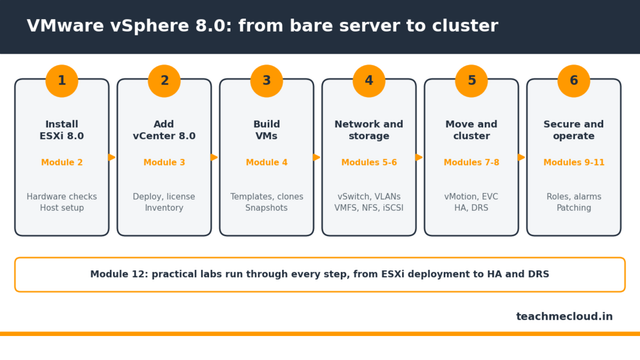
The labs in Module 12 repeat what you learn in Modules 2 to 8. You build the setup yourself, then break it and fix it.
| Term | What it does |
|---|---|
| ESXi | Hypervisor that runs VMs on a physical server |
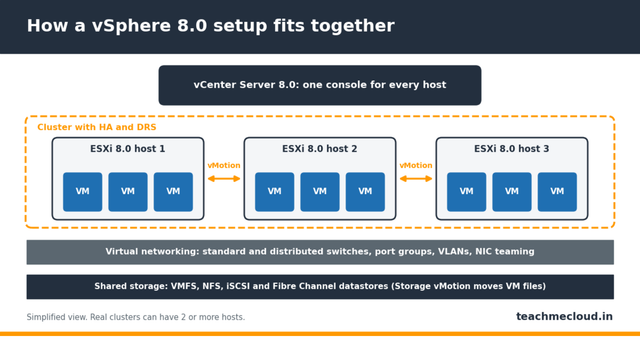
| vCenter | Manages many ESXi hosts from one console |
| vMotion | Moves a running VM to another host with no downtime |
| HA | Restarts VMs on another host if a host fails |
| DRS | Balances VM load across the hosts in a cluster |
| Datastore | Storage space where VM files live (VMFS, NFS and others) |
Want a preview? Watch free lessons on our YouTube channel . When you are ready, check batch details on our courses page .
This course builds administrator skills. Those skills are what VMware exams test.
Find answers to common questions about VMware vSphere 8.0, ESXi, vCenter, certifications and practical training.
VMware vSphere 8.0 is a virtualization platform made of ESXi 8.0 and vCenter Server 8.0. ESXi runs virtual machines on a physical server, and vCenter manages many ESXi hosts from one place.
ESXi is the hypervisor installed on each physical server. vCenter Server is the management layer that controls many ESXi hosts and unlocks features like vMotion, HA and DRS.
Yes. Broadcom lists 11 October 2027 as the end of general support for vSphere 8.0, so many data centers still run it. ESXi, vCenter, networking, storage, vMotion, HA and DRS carry over to newer versions.
Yes. Module 1 starts with virtualization concepts and hypervisors. Basic Windows or Linux administration and networking knowledge makes the labs easier.
vMotion moves a running virtual machine from one host to another without shutting it down. Storage vMotion moves a running VM's files from one datastore to another.
Broadcom's older VCP-DCV (exam 2V0-21.23) covers vSphere 8.x and is now listed as a legacy certification. The current VCP-VVF Administrator (2V0-16.25) covers version 9.0. Check Broadcom's page for the latest exam list.
Yes. We run customised corporate training on request. Use the contact page to share your team size and goals.
See batch details on the Teach Me Cloud courses page , or talk to our team about your goals. More guides are on the Teach Me Cloud blog .
Teach Me Cloud is an independent training provider. VMware, vSphere, ESXi and vCenter are trademarks of Broadcom Inc. and/or its subsidiaries.
 Launch your Graphy