There are no items in your cart
Add More
Add More
| Item Details | Price | ||
|---|---|---|---|
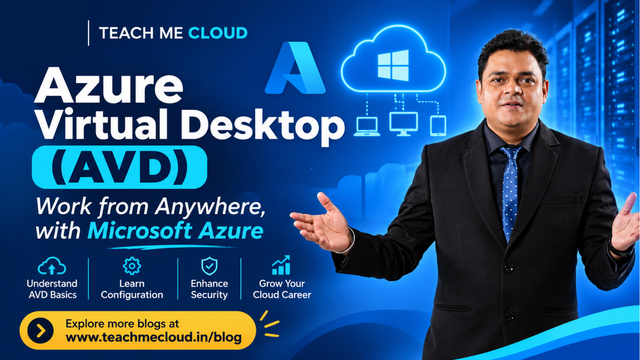
Azure Virtual Desktop is a Windows desktop and app service that runs on Azure. Your users connect from a laptop, tablet or phone, and the work happens on a VM in the cloud.
| Module | Topic | What you cover |
|---|---|---|
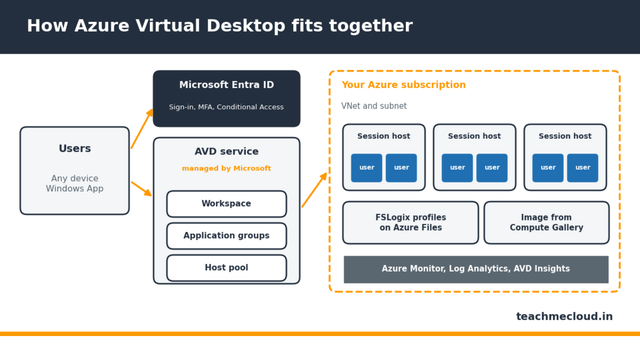
| 1 | Introduction to AVD | Overview, architecture and components, licensing requirements |
| 2 | Azure Infrastructure | Subscription, resource groups, virtual networks, subnets, virtual machines |
| 3 | Identity Management | Microsoft Entra ID, Active Directory, authentication methods, domain join |
| 4 | AVD Deployment | Host pools, personal and pooled desktops, session hosts |
| 5 | Application Management | Application groups, workspaces, RemoteApp, desktop publishing |
| 6 | User Access | User assignment, Windows App configuration, Remote Desktop connectivity |
| 7 | FSLogix Profile Management | Installation, profile containers, Azure Files, profile configuration |
| 8 | Image Management | Custom images, Azure Compute Gallery, session host image deployment |
| 9 | Security Configuration | Azure RBAC, MFA, Conditional Access, network security |
| 10 | Scaling and Cost Optimization | Scaling plans, autoscaling, VM sizing, cost management |
| 11 | Monitoring | Azure Monitor, Log Analytics, AVD Insights, diagnostics |
| 12 | Troubleshooting | Connection issues, session host errors, FSLogix and user profile issues |
| 13 | Practical Labs | End-to-end AVD deployment, RemoteApp publishing, FSLogix, scaling plan |
| Term | What it means |
|---|---|
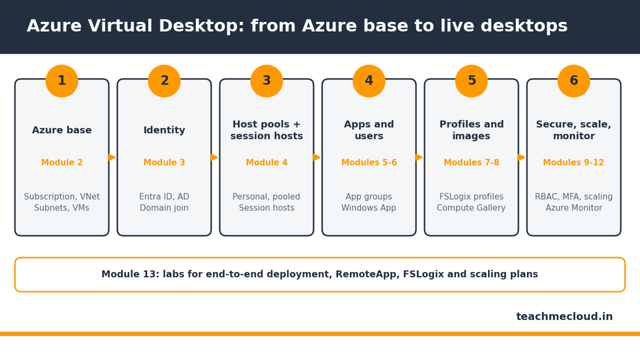
| Host pool | A group of session hosts that serve the same users |
| Session host | The VM where the user's desktop or app actually runs |
| Personal vs pooled | Personal: one VM per user. Pooled: many users share VMs |
| Application group | Publishes a full desktop or individual RemoteApp apps |
| Workspace | The list of desktops and apps a user sees |
| FSLogix | Keeps user profiles in a container so they follow the user |
| Scaling plan | Starts and stops session hosts to save money |
Want a preview? Watch free lessons on our YouTube channel. Ready to join? Check batch details on our courses page.
Microsoft's Azure Virtual Desktop Specialty tests four skill areas. Our modules line up with them:
Azure Virtual Desktop is Microsoft's desktop and app virtualization service on Azure, earlier called Windows Virtual Desktop. Users sign in with Microsoft Entra ID and get a Windows desktop or app from any device.
Eligible licenses include Microsoft 365 E3, Microsoft 365 E5 and Microsoft 365 Business Premium. External users use per-user access pricing. Microsoft's licensing page has the full list.
FSLogix stores each user's profile in a container, usually on Azure Files. The profile follows the user to any session host, so pooled desktops feel personal.
A personal host pool gives each user their own VM. A pooled host pool lets many users share the same VMs, which costs less.
Yes. Microsoft offers the Azure Virtual Desktop Specialty certification through exam AZ-140. The exam runs 100 minutes and the certification renews every 12 months.
No. Module 2 covers subscriptions, resource groups, virtual networks, subnets and virtual machines before you build anything in AVD.
Yes. We run customised corporate training on request. Contact us with your team size and goals.
See batch details on the Teach Me Cloud courses page, or talk to our team about your goals. More guides are on the Teach Me Cloud blog.
Teach Me Cloud is an independent training provider. Microsoft, Azure, Azure Virtual Desktop, Windows and Microsoft Entra are trademarks of the Microsoft group of companies.
 Launch your Graphy